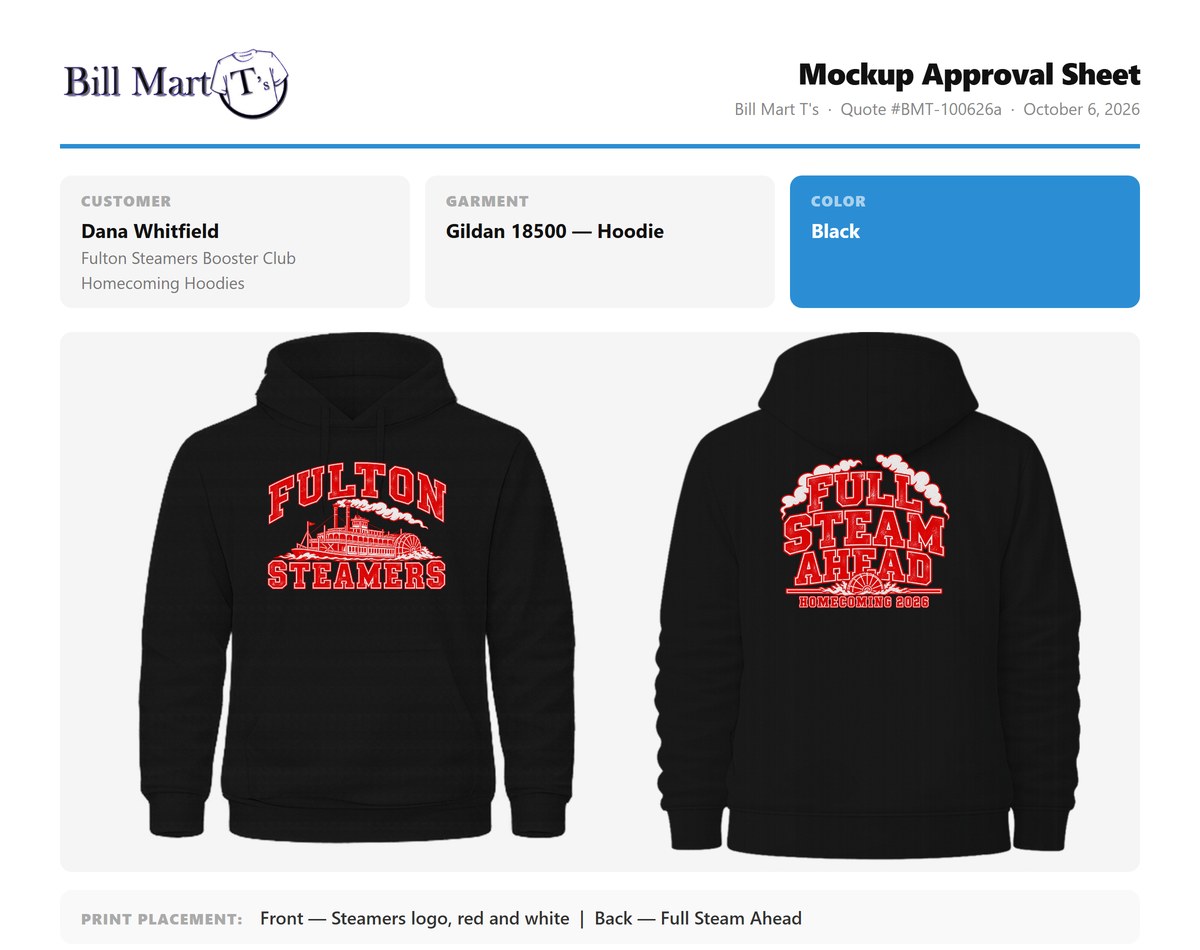
Drop in the design, pick the blank and the color, and save a mockup to send your customer. 10 free a day, no sign-up. On the same page, a price calculator that shows every step of how it got the number.
Garment Gopher · free mockup trial
Free mockup maker
Under Order Items, pick the garment, its color and where it prints.
Under Design Files, upload your art. A PNG with a clear background looks best.
Hit Mockup, then Save the picture. Post it or text it to the customer who's waiting on it.
Your art stays on this computer. It never gets sent to us.
Live from the Jobs sheet. Change status, tick boxes, or click a date to edit it; every change saves to the Sheet right away. Click a customer's name to load that job into the builder below.
Order Apparel.
Everything on jobs in Order Supplies, added up by supplier.
Ticking a line ticks it on each of its jobs; when every line on a job is ticked, that job's Apparel Ordered box ticks too. Status never changes here: move the job with its dropdown.
⚙ Settings & Configuration
✕ Close
📒 QuickBooks
💳 Card Payments
🏢 Business Info
✉ Email button (quotes & invoices)
On a phone the Email button always opens the phone's own mail app.
💳 Deposit Pay Buttons (customer approval page)
💰 Pricing Upcharges
🧵 Embroidery Prices
Charged per piece on any line set to Print: Embroidery: the price for the order's total piece count, times the number of locations, plus extra stitches. Added on top of the garment price. These are starting numbers; change them to your own.
🧢 Upsell
Items you sell besides shirts. Tick what you sell and set your price. Each one shows in the style list under Add-ons, so you can quote it on its own. On any quote you can also tick which of these to offer; they show under the quote as "Don't forget the..." and the customer can ask to add them. Nothing changes the total until you add it.
Sell it
Item
Your cost ($ each)
Price ($ each)
Minimum
🎨 Print Pricing (DTF and Screen Print)
DTF: price = (blank + transfer) × 2 + the price break's $ adder for the whole order, rounded to the dollar. A negative adder takes dollars off. Screen print: price per piece = blank × 2 + a run charge for each print location (by its colors and all the screen-printed pieces in the job). Screens are one charge for the whole job: you type how many screens the job needs on the quote. The run charges and screen fee are your selling prices; your ink cost counts against your profit, never the customer's price. Starter prices are built from real quotes we got from shirt shops across multiple states. Change any of them to fit your shop.
DTF price breaks (whole order)
From
To
$ adder
Screen print run charge ($ per piece per location, by its colors and all the screen-printed pieces in the job)
Count a white base under the colors on a dark shirt as a color.
Shipping charges (by the whole order's pieces)
These fill the Delivery Method list on every quote. Leave To empty on the last one for "and up".
📐 1-11 Piece Prices (fixed, by garment type)
The fixed price per piece for orders of 1-11 pieces (whatever the art cost), for the cheapest blank of each type. Higher-quality blanks price at (shirt + art) × 2, never below this. From 12 pieces up, price = the higher of (shirt + art) × 2 and this floor, minus the quantity discount, rounded once to the nearest dollar. 0 = no floor (cost × 2 applies).
Shop info, pricing, tiers and garments live in the ⚙ tabs of your Google Sheet and load every time the tool opens, on every device. To change a price or add a style, edit the Sheet, then reload this page. Loading a .xlsx here can copy it into the Sheet.
☁️ Google Sheets Sync
Paste the Web App URL from your shop's Google Apps Script deployment (Extensions → Apps Script → Deploy → Web App, in your Google Sheet). Every Quote and Invoice saves straight to that Sheet automatically — no more Excel download to keep track of.
Customer Info
Order Items
This job was saved with the old pricing (1-11 fixed prices and % off), so its prices stay as quoted.
Shows under the quote. The customer can ask to add them; the total doesn't change unless you add them.
Free quote calculator
What should this order cost them?
Your mockup's ready. Here's the price to send with it. The boxes with a dashed edge hold a starting guess, so type your own numbers over them. Every box changes the price.
What you pay for one blank tee, shipping in. Basic tees run about $3.50 to $6.
Dark shirt? Count the white base under the colors as one more.
50% is your cost times 2.
For art you have to make or fix. Leave it at 0 if their file is ready to print.
Each one adds $ to its price. Counted here as 2XL.
A back or sleeve print. Pricing guides put it around $3 to $12 a shirt.
In Garment Gopher this price comes from your own price sheet, on a quote your customer approves with one tap. Try it free for 14 days, no card.
Your 30 free days are up.
The mockup maker lives inside the full tool, next to the quotes, work orders and invoices.
Free mockups
That's your 10 for today.
Ten more show up tomorrow. If the customer can't wait that long, start the free 14 days and make as many as the day needs. No card.