 Garment GopherShirt shop software: from first quote to money in the bankCall or text 563-210-0678
The crew won't use the new system. Give each person one screen that answers the question they ask you every day.
Thursday, 2 PM. The new job board has been up for a week, and the person on the press just walked to the front counter to ask what's printing next.
When employees won't use new software, start with the one question each person asks you out loud every day.
Show them the one screen that answers it. Then answer from that screen yourself, every time.
Skip the full training. One person, one question, one screen. The rest of the software can wait.

One line per person: the question they ask most, the screen that answers it, and what they do there in week one.
Free, no sign-up. On a phone, pick Print, then Save as PDF.
Write down the question each person asks you every day
For one day, keep a notepad by the counter. Every time someone walks up with a question, write who asked and what.
In most shirt shops the list comes out short:
- The press: what's next, and what sizes?
- The front counter: is it ready, and did they pay?
- Whoever orders blanks: what do I need to order?
- The parent who built the shop: what's late?
Those questions are why people walk to the front. Answer them somewhere else and the walking stops.
Show each person only the screen that answers their question
Sit with each person for ten minutes, on their phone or the shop computer. Show them their one screen, then have them find tomorrow's job on it.
Leave out the quote screen, the settings and the invoices. Someone running a press doesn't need to know how a quote gets priced to see what's next.
Write their screen on the crew card. That's their whole training for week one.
Answer from the screen, starting with whoever runs the shop
Here's where most rollouts quietly die. The press asks "what's next?" and the owner answers from memory. Now the screen is optional.
So when someone asks, open the screen and read the answer off it together. Even when you already know.
If your mom or dad still runs the counter, this part is theirs too. Ask for one week of trying it. A week is easier to say yes to than forever.
Keep the paper the press actually reads
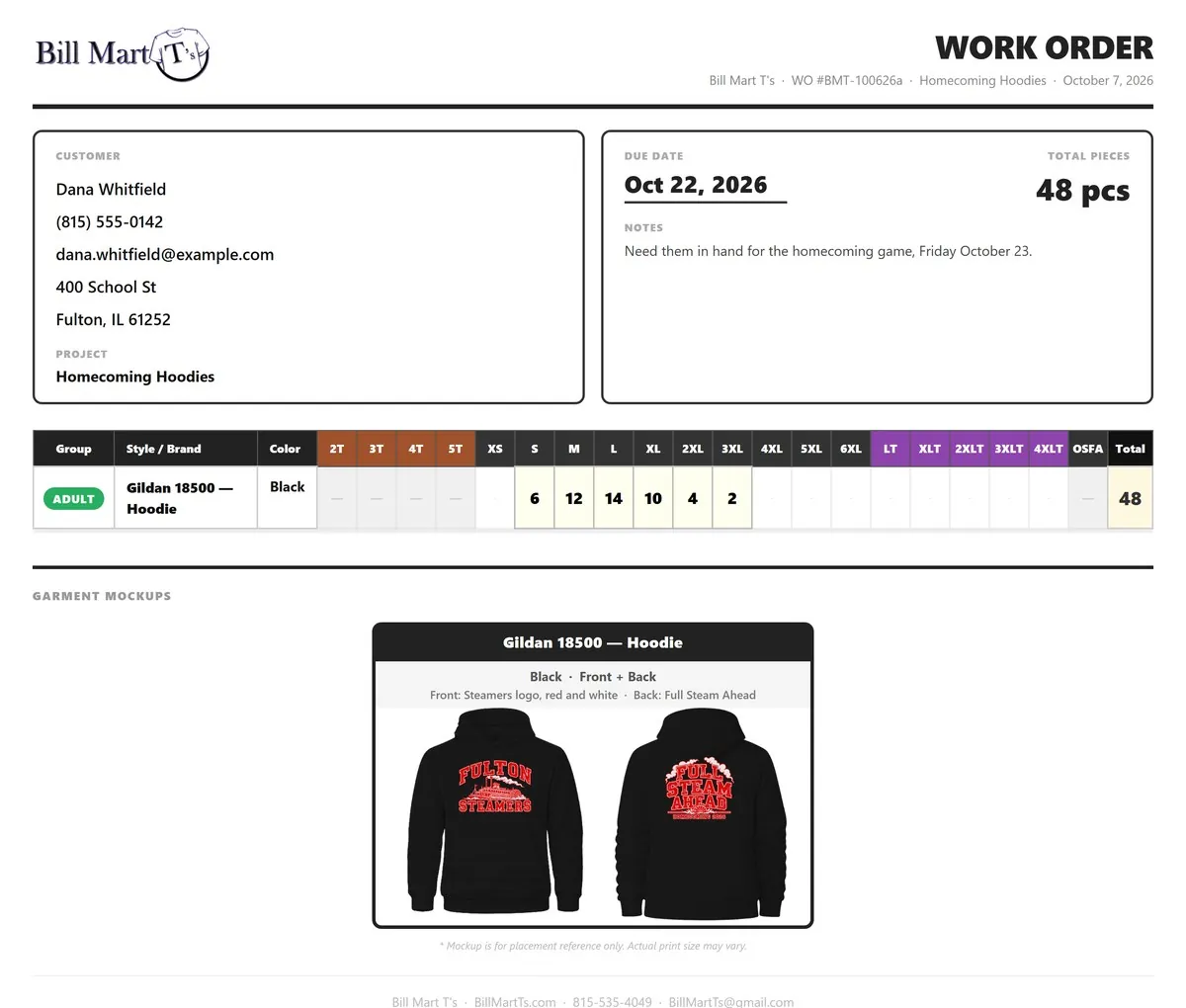
Most crews read one piece of paper at the press: the work order. Keep printing it.
Print it from the same job everyone sees on the screen, so the printout and the screen never disagree. A work order clipped to the press still counts as using the new system.
Our screen printing work order template shows what belongs on it.
Make the person with 20 years at the press the checker
The person who's stood at the same press for 20 years knows every way an order goes wrong. Give them that job on purpose.
Each morning, they check the screen against what's on the shelf and the press, and tell you what's off: wrong sizes, a due date that slipped, a job nobody marked done.
Every mistake they catch makes the screen better. And they're helping run it now.
On Friday, count the questions still asked out loud
Keep the notepad by the counter for the rest of the week. On Friday, count the walk-up questions again and write both numbers on the card.
Look at who's still asking, and what. That person needs ten more minutes, or they got the wrong screen. Fix that one line on the card.
When the walk-ups are mostly gone, the old board can come down. Our guide to a paperless print shop moves the rest of the shop one step at a time.
Still on a paper board for now? The print shop production schedule sheet keeps the week in due date order.
Where Garment Gopher fits
Garment Gopher puts each of those answers on one screen, on a computer or a phone.
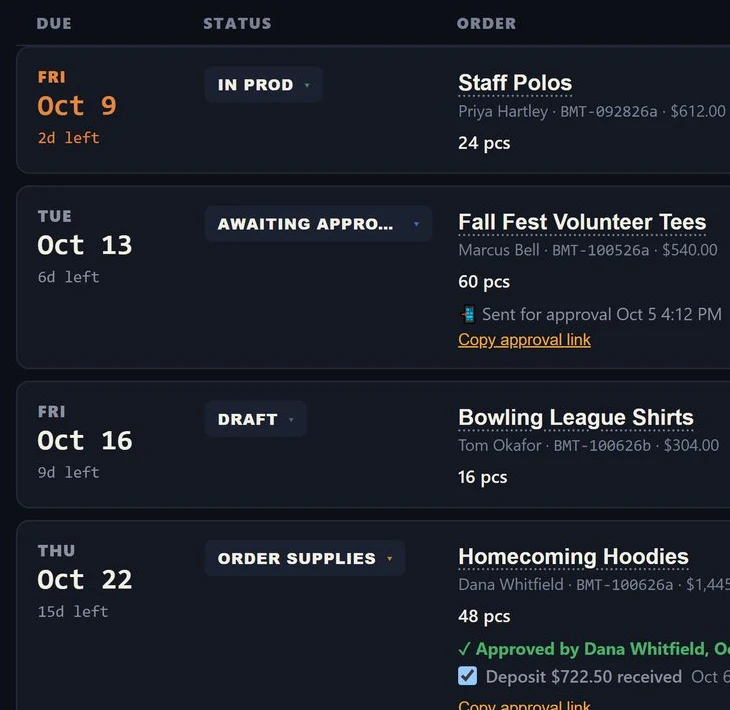
- The press: the Job Board lists In Production jobs first, then soonest due. The work order prints with the size grid by style and color, the print method and the mockups, and no prices.
- The counter: every job shows its status, like Awaiting Deposit or Needs Delivered, with a plain next step for that status. Ticking Paid moves the job.
- Blanks: the Order Apparel list adds up every job in Order Supplies that still needs blanks, by supplier, style, color and size.
- What's late: overdue jobs show red, and jobs due in the next three days show amber.
- Logins: everyone gets their own email and password at no extra charge. The owner adds people and can turn a login off. Only the owner manages people, garment costs, the card on file and the data download.
Statuses change by hand, so someone still moves each job along. The crew card is how that someone gets picked.
It's $79 a month for everybody in the shop, and the first 14 days are free with no card.
Start my free 14 days