 Garment GopherShirt shop software: from first quote to money in the bankCall or text 563-210-0678
Reorder reminder text. Three messages that don't sound like a sales pitch.
It's the second week of February. Last April you made 22 navy shirts for your coworker's softball team, and you've typed "Hey!" to her three times and deleted it.
A good reorder reminder message goes out 6 to 8 weeks before last year's date, names last year's order, and asks one yes-or-no question. Here's the first one, filled in:
%3C/text%3E %3Ctext x='280' y='64' font-size='13' fill='%23777777' text-anchor='middle'%3ESat, Feb 13%3C/text%3E %3Crect x='128' y='82' width='408' height='150' rx='18' fill='%231f6fe0'/%3E %3Cg font-size='17' fill='%23ffffff'%3E %3Ctext x='146' y='112'%3EHi Jess, it's Amanda. I made the 22 navy%3C/text%3E %3Ctext x='146' y='136'%3Eshirts for your Tuesday softball team%3C/text%3E %3Ctext x='146' y='160'%3Elast April. Same again this year? If I%3C/text%3E %3Ctext x='146' y='184'%3Ehave sizes by March 20, they're ready%3C/text%3E %3Ctext x='146' y='208'%3EApril 10.%3C/text%3E %3C/g%3E %3Crect x='24' y='250' width='250' height='48' rx='18' fill='%23ffffff' stroke='%23dddddd'/%3E %3Ctext x='42' y='280' font-size='17' fill='%23111111'%3EYES. Same shirts. Sizes soon!%3C/text%3E %3C/svg%3E)
The reply in the picture is the one you're hoping for. All three texts are below, with a Copy button on each.
Three reorder reminder messages to copy
Each one is for a different moment. Swap in your customer's name, last year's order and their date. Keep the rest.
Text 1: the same order again
Hi [name], it's [you]. I made the [number] [color] shirts for your [team or group] last [month]. Same again this year? If I have sizes by [date], they're ready [date].
Send it to whoever placed the order. It works for a team, a coworker group, a church or a family. The two dates come from their event, worked backward, so the deadline is real.
Text 2: one follow-up a week later
Hi [name], checking you saw my text about the [team or group] shirts. If you're skipping shirts this year, no worries. If you want them, sizes by [date] still works.
People miss texts. One follow-up is a favor. Then stop. If text 2 gets nothing, write it down and try again next year.
Text 3: the one-time customer with a yearly reason
Hi [name], it's [you]. Your [event] shirts were last [month]. Is the [event] on again this year? I kept the design, so I can change the year and print the same shirts.
This is for the family reunion, the 5K, the bachelorette trip. They ordered once and never thought of it as a yearly thing. You're reminding them it is.
Only send the "I kept the design" line if you did. Save every customer's art in a folder with their name and the year.
Last year's numbers do the asking for you
A reminder reads as pushy when it's about your sales. These read as help, for four reasons:
- Their order, in numbers. "22 navy shirts" means they don't have to dig through old texts to remember.
- One question. "Same again this year?" takes a one-word answer.
- Their deadline. Sizes by March 20 for April 10 is about their season, not your calendar.
- No discount pitch. Nobody asked for one. A coupon in a reminder turns help into an ad.
Send it 6 weeks before last year's date, 8 for a team
Team and school orders need sizes from a lot of people, so they get 8 weeks. Everyone else gets 6.
In the example, the shirts were ready April 10. Eight weeks back is February 13, so text 1 goes out February 13 and text 2 on February 20. A reunion on July 17 gets text 3 on June 5.
Too early and they haven't thought about it yet. Too late and somebody's cousin with a heat press got the order. The busy season call list works out the date for every repeat customer at once.
If the person who ordered last year has moved on, text 1 goes nowhere. The booster club shirt orders post covers asking who's next before they leave.
Keep last year's order where you can find it
None of these texts work if last year's order is buried in a group chat. When an order is picked up, write down five things: who ordered, their phone, what and how many, the size split, and the date they needed it.
A notebook page or a row in your spreadsheet is enough. When they say yes, quote it at this year's prices, since blanks may have gone up.
This is one step of keeping repeat customers: what to say when you reach out. Our repeat customers in screen printing guide puts every customer on one yearly list, with the month to call each one.
Where Garment Gopher fits
Garment Gopher keeps last year's order and tells you when to send the text. Saving a job saves the customer's name, phone and email, and how many times they've ordered.
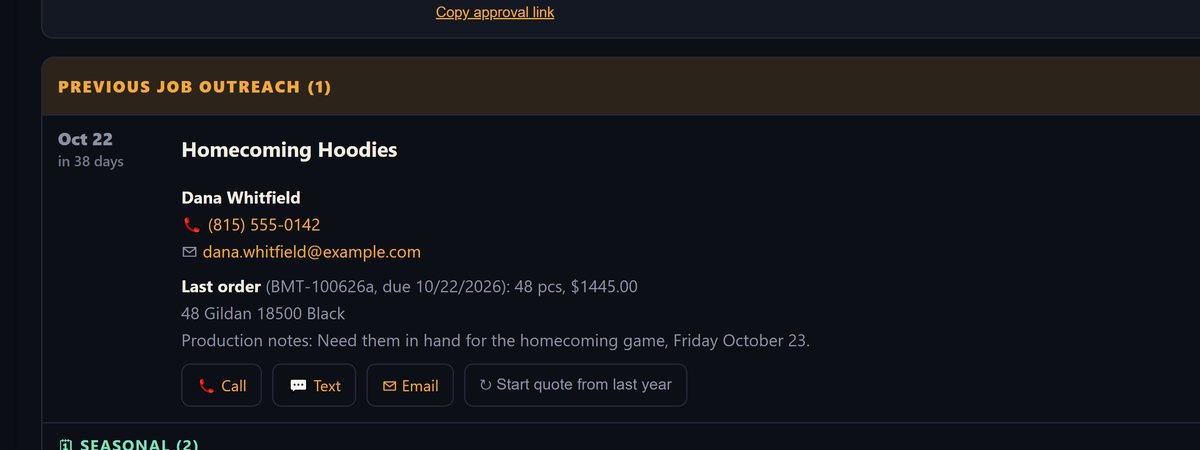
Each past job comes back on the Previous Job Outreach list 6 weeks before the same date next year, 8 for team and school jobs, with last year's order on it. You can change the date if their event moved.
The Text button opens your own phone's Messages; the app doesn't send texts for you. Paste in one of the three above. The contact log keeps each Sent text with the date and who sent it, and Done clears the job until next year.
When they say yes, Start quote from last year turns the old order into a new quote with a new number and today's prices.
For the reunion kind of customer, + Add date saves a yearly date with no job behind it. Reminders come from your 500 most recently updated jobs.
One price, $79 a month, covers everybody in the shop. The first 14 days are free with no card.
Start my free 14 days