 Garment GopherShirt shop software: from first quote to money in the bankCall or text 563-210-0678
DTF vs screen printing cost on your own numbers. Run it at 24, 48 and 72 before you quote.
The request is on the front counter: 48 shirts, a four-color logo on the front, due in two weeks.
Your screen printer says burn the screens. Whoever runs the heat press says DTF, it's done by lunch.
DTF costs less on small runs, and screen printing costs less once its setup is spread over enough shirts.
Where that line falls depends on your colors and your setup costs.
Work it out once at 24, 48 and 72 shirts, and you'll know the answer before the phone call ends.
The guides that rank for this question disagree on the crossover by a lot, because each one uses somebody else's costs.
Here's how to find yours, with a worked example and a free worksheet.
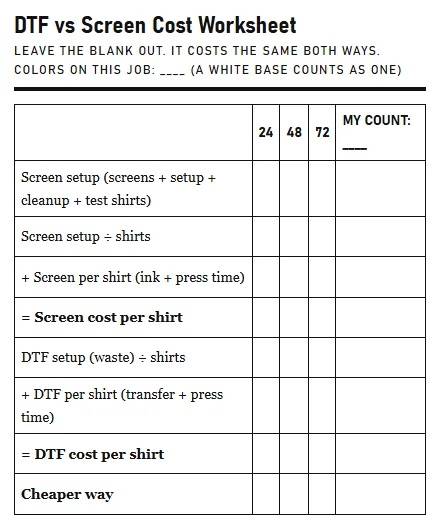
Leave the blank out, it costs the same both ways
A 48-piece order needs 48 blanks whichever way you print it. So the comparison only counts what changes: screens, setup, ink, transfers and time on the press.
The one place a blank sneaks back in is waste. Screen printing often costs you a couple of shirts for test prints and registration.
DTF costs you the odd crooked press. Count those as part of each method's setup.
Add up what one screen really costs you
Screen printing's cost is mostly up front. These are example numbers, so swap in yours. Labor is figured at $24 an hour, which is 40 cents a minute.
- Each screen: $4 in film, emulsion and tape, plus about 30 minutes to coat, burn, tape and reclaim it later. That's $16 a screen.
- Press setup: about 10 minutes a color to register and get a good print. $4 a color.
- Cleanup: about 7 and a half minutes a color to clean the screens and get ink back in the can. $3 a color.
- Test prints: two shirts at an example $4.25 each, $8.50.
- Per shirt: about 10 cents of ink a color, plus press time. A four-color job on a manual press at 30 shirts an hour is 80 cents of labor a shirt.
For the four-color logo, that's $100.50 before the first good shirt comes off the press, then $1.20 a shirt after that.
DTF costs about the same on shirt 1 and shirt 72
DTF flips it. Almost nothing up front, and a real cost on every shirt. Example numbers:
- Transfer: $3.50 for a front print.
- Press time: at 40 shirts an hour, 60 cents a shirt.
- Waste: plan on one ruined shirt and transfer per order, $7.75.
That's $7.75 up front and $4.10 a shirt. Four colors or fourteen, the transfer costs the same.
Four colors flips between 24 and 48
Spread each method's setup over the shirts and add the per-shirt cost. For the four-color logo:
- 24 shirts: screen $5.39 a shirt, DTF $4.42. DTF wins by about 97 cents a shirt, $23 on the order.
- 48 shirts: screen $3.29, DTF $4.26. Screen wins by 97 cents a shirt, about $46 on the order.
- 72 shirts: screen $2.60, DTF $4.21. Screen wins by $1.61 a shirt, about $116 on the order.
With these numbers the two meet at about 32 shirts. Under that, press transfers. Over it, burn screens.
So the 48-shirt order on the counter goes to the screen printer, and the next 20-shirt order with the same logo goes to the heat press.
To find your own crossover, take screen setup minus DTF setup, and divide it by DTF's per-shirt cost minus screen's per-shirt cost. Here that's $92.75 divided by $2.90, which is 32.
Fewer colors pull the crossover way down
Run the same example with fewer screens and the line moves fast:
- Two colors (pressing 45 an hour): $54.50 up front and about 73 cents a shirt. Screen is cheaper from about 14 shirts. At 24 it's $3.00 a shirt against DTF's $4.42.
- Three colors (36 an hour): $77.50 up front and about 97 cents a shirt. The crossover is about 22 shirts, and at 24 the two are within 22 cents.
Watch the dark shirts.
A two-color design on black usually needs a white base under it, which is one more screen, so price it as a three-color job.
In this example, going from two colors to three moved the crossover from 14 shirts to 22.
Some art decides it before you do the math
A photo, a soft gradient or a design with a dozen colors means a pile of screens and a slow press.
DTF prints it the same as a one-color logo, so it usually wins on cost at the counts most small shops see.
On the other side, a one-color design on 100 light shirts is about as cheap as screen printing gets.
Reorders change it too.
If last year's screens are still on the rack and the art hasn't changed, cross the screen cost off the worksheet and run it again. The crossover drops.
The worksheet also can't see whose time it is.
If the press is booked solid through Friday and the heat press is free, that counts, even when screen wins by a few dollars.
Deciding which jobs go where each week is easier with a production schedule everyone can see.
Write your crossovers on the wall by the phone
Do the worksheet once for one, two, three and four colors, and you'll have four numbers.
Tape them where whoever answers the phone can see them.
"Four colors, under 32, it's DTF" is a decision anybody at the front counter can make.
Redo it when something changes: a new transfer supplier, a price increase on film or emulsion, a new hire running the press, an automatic press that doubles shirts an hour.
Each of those moves the line.
And keep the cost separate from the price. This worksheet tells you which way is cheaper for you to make.
What you charge on top of it is its own question, and our free shirt price calculator and the post on what to charge friends for custom shirts both walk through it.
Once you know the method, the blanks for every job get ordered together with a blank shirt tally sheet.
One page.
Fill in your labor rate, screen costs, ink and transfer price once. Then work each method at 24, 48, 72 and your own count, see which is cheaper, and write your crossover for one, two, three and four colors at the bottom.
On a phone, pick Print, then Save as PDF. Tape the bottom row by the phone.
This is step two of every quote: picking the print method before you price.
Our guide on how to quote custom t-shirts walks one order from the first text to a written price.
Where Garment Gopher fits
Garment Gopher prices both methods from numbers you set.
In Settings you put in your DTF transfer cost and price breaks, your screen run charges and your screen fee ($20 a screen to start).
The first thing on each line is how it prints: DTF, Screen print or Embroidery. You know your press, so you make that call.
On a screen line, every print location gets its own colors and its own run charge, so a 4-color front and a 1-color back price as two prints.
You type how many screens the whole job needs, and the quote shows them once, like "Screens: 5 x $20 = $100."
Put the same front on tees and hoodies and those screens still show up one time.
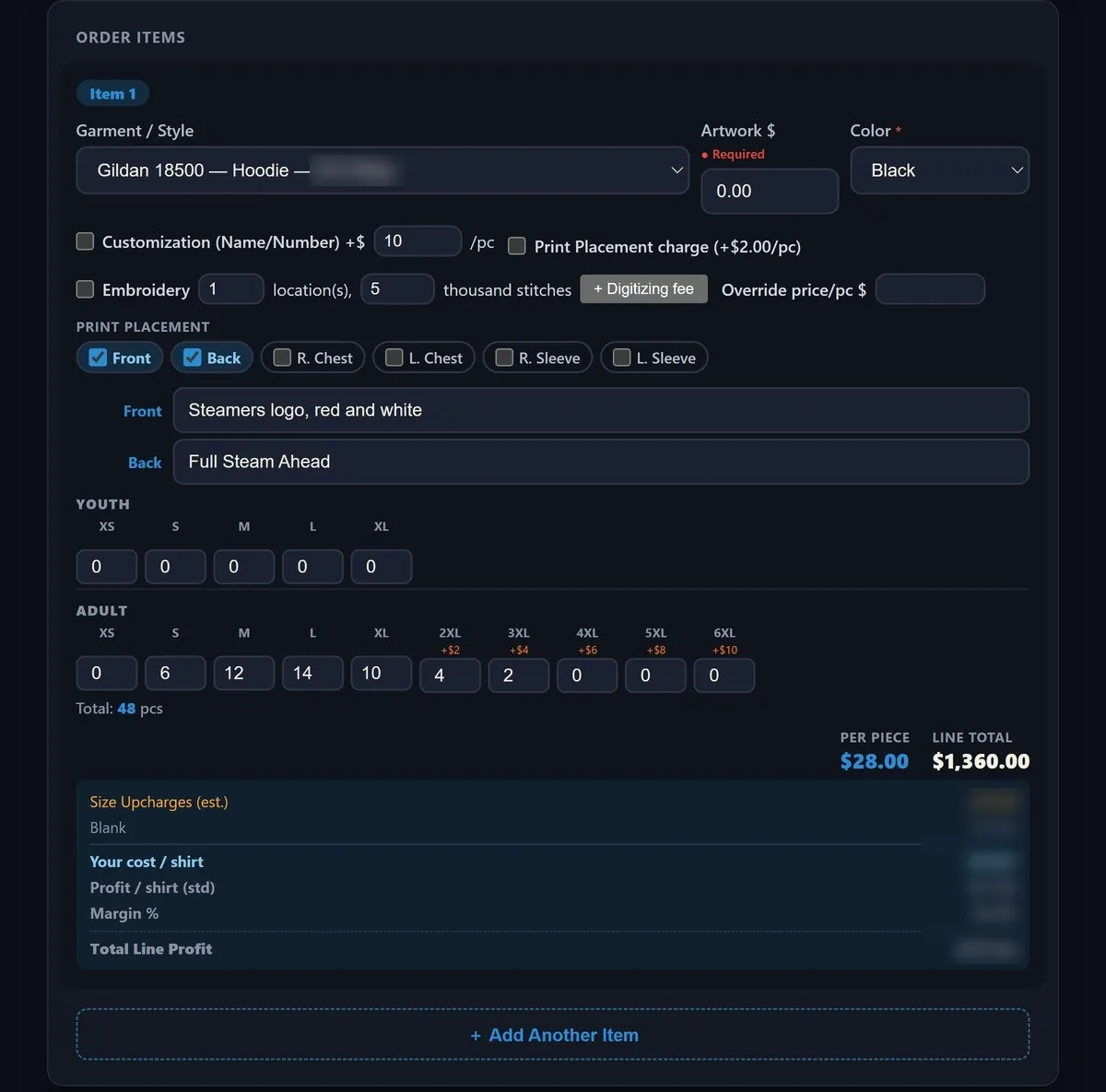
Set your run charges and screen fee from your worksheet and the quotes match your shop. Those are prices you set.
Your ink cost per color goes in Settings too, and it only comes out of your profit, never the customer's price.
The line reminds you to count a white base as a color.
Every line shows your cost, profit per shirt and margin while you quote, and the customer never sees them.
Each screen location also has a box for the ink colors, in your words.
The quote, the approval page and the work order print it as typed: "Screen print: Front 4 colors (White, Red, Navy, Gold), Back 1 color (White)."
The customer signs off on the inks, and the press knows the job.
It's $79 a month, everybody in the shop logs in, and the first 14 days are free with no card.
Start my free 14 days